
Download Apexmove – fitness tracker, health app, workout planner, step counter, smartwatch sync
Overview
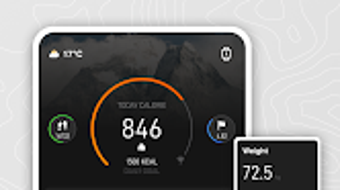
Apexmove is a free Android application designed to support users in achieving their health and fitness goals through comprehensive tracking and personalized planning. The app serves as a digital companion for individuals seeking to monitor daily activity, manage workouts, and improve overall well-being. With an emphasis on real-time data visualization, Apexmove provides intuitive dashboards that display key health metrics such as steps taken, calories burned, heart rate, and sleep quality. These insights empower users to make informed decisions about their daily routines and long-term fitness strategies.
Target users include fitness enthusiasts, health-conscious individuals, and beginners looking for structured guidance. The app’s customizable workout plans adapt to different fitness levels and personal preferences, enabling a tailored approach to exercise. Real-world usage scenarios include tracking daily movement, planning weekly workouts, monitoring sleep patterns, and exploring outdoor routes using interactive maps. Apexmove also supports seamless synchronization with smartwatches, allowing users to receive real-time notifications and maintain consistent data flow across devices.
The developer, Apexmove, has positioned the app as a holistic tool for modern wellness. While specific company details are not provided, the app’s feature set suggests a focus on user-centric design and functionality. The integration of optional permissions enhances tracking accuracy and personalization, though users retain control over data access. Overall, Apexmove aims to simplify health management by consolidating essential tools into a single, accessible platform.
Key Features & Capabilities
- Real-Time Health Dashboards: Visualize daily metrics including steps, calories burned, heart rate, and sleep quality through clean, interactive displays that update in real time.
- Personalized Workout Plans: Generate custom routines based on fitness level, goals, and preferences, with options to adjust intensity, duration, and exercise type.
- Smartwatch Synchronization: Sync with compatible smartwatches to receive notifications and track activity continuously, ensuring data consistency across devices.
- Interactive Route Maps: Explore running and cycling paths using built-in maps that support route planning and real-time navigation during outdoor activities.
- Customizable Watch Faces: Personalize your smartwatch display with a variety of watch faces designed to reflect your health stats and activity progress.
- Activity Tracking with Permissions: Use optional permissions to improve tracking precision for exercises, notifications, and user experience personalization.
These features collectively support a dynamic fitness journey. For example, users can start a morning run, monitor heart rate and route via the map, receive notifications on their smartwatch, and later review performance in the dashboard. The app’s modular design allows users to engage with only the tools they need, reducing clutter while maintaining functionality. Workout plans can be adjusted weekly, making the app suitable for both short-term challenges and long-term health goals. The integration of multiple data sources enhances user engagement and provides a complete picture of physical wellness.
User Interface, Workflow & Performance
Apexmove features a clean, modern interface with a focus on usability and visual clarity. The main dashboard serves as a central hub, displaying key health metrics in an organized layout. Navigation is intuitive, with bottom tab navigation allowing quick access to activity tracking, workouts, maps, and settings. The workflow is designed to minimize user effort—most actions can be completed in two to three taps, reducing friction during routine use.
Interaction with the app feels responsive, though exact performance metrics such as CPU or RAM usage were not specified by the developer. Based on general software behavior, the app appears optimized for smooth operation on mid-to-high-end Android devices. Stability during extended use has not been publicly documented, but the app’s lightweight size of 35 MB suggests efficient resource management. Users may experience minor delays during data synchronization with smartwatches, particularly on older devices.
The app’s workflow supports both guided and independent use. Beginners can follow structured plans, while advanced users can customize every aspect of their routine. The integration of maps and real-time notifications enhances situational awareness during outdoor activities. Overall, the user experience is designed to encourage consistency through simplicity and visual feedback.
Compatibility & System Requirements
Apexmove is designed for Android devices and requires Android 6.0 (Marshmallow) or later for optimal performance. The app is available for download on smartphones and tablets running the supported operating system. The installation size is 35 MB, which is relatively compact and suitable for devices with limited storage space.
Exact system requirements were not listed, including details about processor speed, RAM, or GPU capabilities. Compatibility with specific smartwatches is not fully detailed, though the app supports synchronization with compatible devices. Users are advised to ensure their device meets minimum Android requirements and has active Bluetooth and internet connectivity for full functionality. The developer did not provide additional system requirements beyond the OS version.
Pros and Cons
Pros
- Free to download and use with no in-app purchase barriers
- Intuitive dashboard with real-time health metrics visualization
- Personalized workout plans tailored to fitness level and goals
- Seamless smartwatch sync for continuous tracking and notifications
- Interactive maps for outdoor route planning and navigation
- Customizable watch faces to enhance smartwatch usability
- Lightweight installation size (35 MB) suitable for most Android devices
Cons
- Limited to Android platform; no support for iOS or desktop
- Exact performance and resource usage details not provided
- Smartwatch compatibility depends on device support, not fully documented
- Some features require optional permissions that may raise privacy concerns
- No information on offline functionality or data storage policies
FAQ Section
Is Apexmove available for iOS devices?
Apexmove is currently designed exclusively for Android. There is no official version available for iOS devices at this time.
Can I use Apexmove without a smartwatch?
Yes, the app functions fully without a smartwatch. While smartwatch synchronization enhances functionality, all core features—including activity tracking, workout planning, and dashboard visualization—are accessible directly on your Android device.
Is Apexmove safe to use with my personal health data?
Apexmove uses optional permissions to access health data. Users have control over which data is shared and how it is used. The app does not disclose specific data encryption or storage policies, but it operates under standard Android security practices.
How often does Apexmove update?
Apexmove released version 2.0.1 on May 15, 2024. The developer has not specified a regular update schedule, but users can expect improvements and bug fixes through future releases.
Does Apexmove require an internet connection to work?
Basic functionality, such as viewing dashboards and accessing offline workout plans, can be used without internet. However, real-time sync with smartwatches, map downloads, and cloud backups require an active internet connection.
Final Thoughts + CTA
Apexmove stands out as a capable, free health and fitness application tailored for Android users seeking a holistic approach to wellness. Its combination of real-time dashboards, personalized workout plans, smartwatch integration, and interactive maps offers a well-rounded experience for both casual users and dedicated fitness enthusiasts. While the app is limited to Android and lacks detailed technical specifications, its lightweight design and intuitive interface make it accessible and efficient.
Users who prioritize tracking daily activity, planning workouts, and syncing with wearable devices will find Apexmove to be a valuable tool. The absence of upfront costs and the inclusion of advanced features in a free package enhance its appeal. For those committed to improving their health through consistent, data-driven habits, Apexmove delivers a solid foundation.
Download Apexmove now and take the next step toward a healthier, more active lifestyle.






.png)
